
Improved Security and Faster Workflows for Codimg Hub
Healthcare • 8 minute read

07 Sep 2026 • 8 minute read

Duncan Ritchie • Media Team
07 Sep, 2026
Healthcare • 8 minute read
07 Sep 2026 • 8 minute read
Duncan Ritchie • Media Team
07 Sep, 2026
The latest update to the Codimg Hub platform brings improved security with the introduction of multifactor authentication.
In addition, you can now export your created analysis in XML format, edit multiple user profiles at the same time and permit standard users to upload videos to the platform.
In this blog, we’ll take a look at all these great new features and show you how they work.
So, let’s get started…
Multifactor Authentication helps keep your account safer and more secure.
The next time you log into Hub will will be asked for a verification code:
This code will automatically be sent to the email address associated with your account.

Copy and paste this number into the field in the login screen and you will be able to access your account.
Users can now export their analysis data in XML format from the Hub platform. This is useful when you want to use it in external programs such as Codimg’s desktop software.
This process can be done with both analysis data that has been uploaded to Hub and with data that has been created in Hub.
To do this:


Super Administrators can change permissions for Standard Users to allow them to upload video files and documents.
To do this, click on your profile picture and select Users.
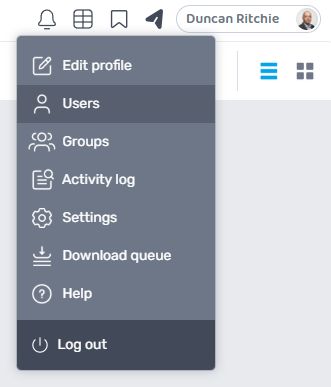
Select any user and then check Allow uploads for standard users followed by Save changes.

Once this is done, the Upload permission column will change from red to green for that user.
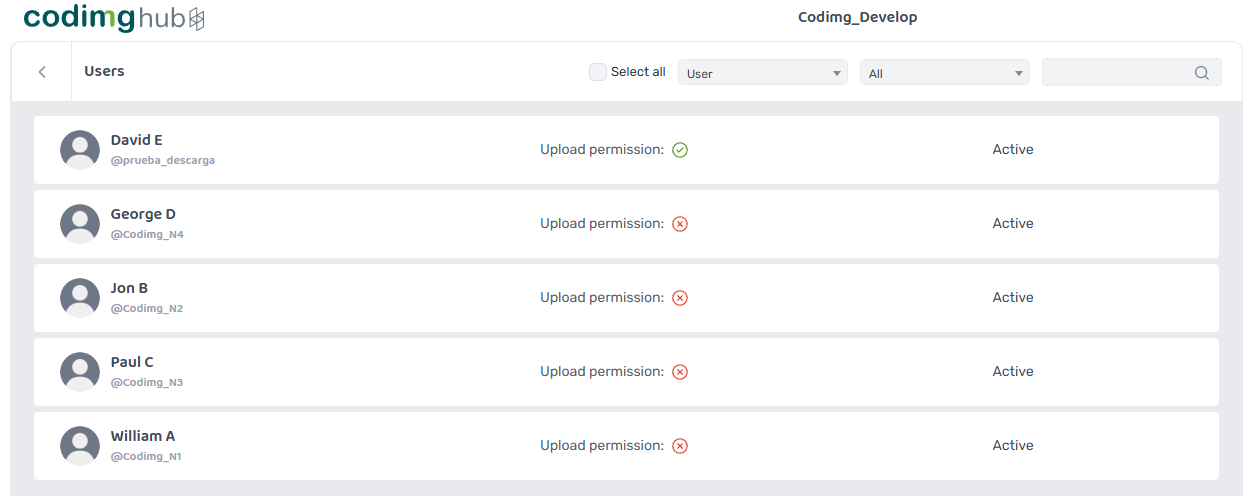
Uncheck the box to revoke upload permission.
You can change upload permissions for multiple users at the same time.
Simply select all the users that you wish to change, click on the settings icon, check All uploads and accept.

All selected users will now be permitted to upload videos and documents to the account.
Please note: Standard Users can move uploaded files to any folder in the account they have access to.
As well as changing upload permissions, you can now edit various aspects of user accounts from the same screen.
When you select multiple users, a few new options will appear at the top of the screen.

When deleting a user, you will be given the option to delete the user and their uploaded files or delete the user and transfer uploaded files to your own account.
Please note: If you choose the former, you will be unable to recover these files.

All of these new features will be added to your Hub account on Monday the 7th of September 2026. There will be a short interruption this day to complete the update.
If you have any questions about this update or any of the processes you have read about in this article, please don’t hesitate to get in contact with us. We’ll be happy to steer you in the right direction.
Until then…
Thanks for reading.
Clinical simulation is now the gold standard for training healthcare professionals in a controlled a...
José Francisco Cervera-Mérida, PhD is a speech and language therapist and lecturer at...
The latest and greatest version of Codimg is now available to download and install. The big...

Subscribe to our newsletter and receive a monthly compilation of articles, interviews and Codimg tips for video analysis.
Once a month, we'll send a compendium of our best articles, interview and advice, straight to your inbox. Enjoy!

 Cookie Consent Manager
Always active
Necessary cookies are required to enable the basic features of this site, such as providing secure log-in or adjusting your consent preferences. These cookies do not store any personally identifiable data.
Name |
Domain |
Duration |
PHPSESSID |
www.nacsport.com |
Session |
|
Cookies are small text files that are placed on your computer when you visit our website. They are used to save your activity history in our website so when you visit it again, we can identify you and configure the content based on your navigation habits, your identity and preferences. Cookies can be accepted, rejected, blocked and deleted. You can do this in the following options available in this window or by configuring your browser. |
||
Cookie generated by applications based on the PHP language. This is a general purpose identifier used to maintain user session variables. It is normally a random generated number, how it is used can be specific to the site, but a good example is maintaining a logged-in status for a user between pages.
No cookies to display |
Analytical cookies are used to understand how visitors interact with the website. These cookies help provide information on metrics such as the number of visitors, bounce rate, traffic source, etc.
Name |
Domain |
Duration |
_gid |
.nacsport.com |
a day |
|
Contains a unique identifier used by Google Analytics to determine that two distinct hits belong to the same user across browsing sessions. |
||
_gat_* |
.nacsport.com |
a minute |
|
Google Analytics Tracking, includes Google Universal Analytics Tracking-ID. |
||
_ga |
.nacsport.com |
a year |
|
Contains a unique identifier used by Google Analytics to determine that two distinct hits belong to the same user across browsing sessions. |
||
_ga_* |
.nacsport.com |
a year |
|
Contains a unique identifier used by Google Analytics to determine that two distinct hits belong to the same user across browsing sessions. |
||
Performance cookies are used to understand and analyse the key performance indexes of the website which helps in delivering a better user experience for the visitors.
No cookies to display |
Advertisement cookies are used to provide visitors with customised advertisements based on the pages you visited previously and to analyse the effectiveness of the ad campaigns. No cookies to display
No cookies to display |
Other uncategorised cookies are those that are being analysed and have not been classified into a category as yet.
Name |
Domain |
Duration |
webpSupport |
- |
Session |
|
- |
||


* Required fields

Our team has received your request and will contact you ASAP.